 CyberMind-FR
403283419c
CyberMind-FR
403283419c
Major documentation improvements and restructuring for better maintainability
and navigation.

## Structural Changes

### New Documentation Organization
- Move all documentation to DOCS/ directory for better organization
- Create DOCS/archive/ for historical documents
- Move deployment scripts to secubox-tools/ directory

### Archived Documents
- COMPLETION_REPORT.md → archive/ (project milestone)
- MODULE-ENABLE-DISABLE-DESIGN.md → archive/ (feature implemented)
- BUILD_ISSUES.md → archive/ (issues resolved)
- Add archive/README.md with archiving policy and document index

## Documentation Enhancements

### Version Standardization
- Add version headers to CLAUDE.md (v1.0.0)
- Add version headers to BUILD_ISSUES.md (v1.0.0)
- Standardize date format to YYYY-MM-DD across all docs

### Cross-References & Navigation
- Add "See Also" sections to PERMISSIONS-GUIDE.md
- Add "See Also" sections to VALIDATION-GUIDE.md
- Link quick references to detailed guides
- Improve documentation discoverability

### Architecture Diagrams (Mermaid)
Add 3 professional diagrams to DEVELOPMENT-GUIDELINES.md:

1. **System Architecture Diagram** (§2)
   - Complete data flow: Browser → LuCI → RPCD → ubus → System
   - Color-coded components by layer
   - Shows JavaScript, RPC, RPCD daemon, UCI, system services

2. **Deployment Workflow Diagram** (§9)
   - Step-by-step deployment process with validation checkpoints
   - Error recovery paths for common issues (403, 404, -32000)
   - Local validation, file transfer, permission fixes, service restarts

3. **Component Hierarchy Diagram** (§1)
   - Standard page structure and CSS class relationships
   - Page → Header → Stats → Content → Cards → Buttons
   - Shows design system component organization

## New Files

### TODO-ANALYSE.md
- Comprehensive documentation improvement roadmap
- Tasks categorized: Immediate, Short-term, Long-term, Optional
- Progress tracking with acceptance criteria
- Covers testing, security, performance guides
- Documentation automation plans

## Benefits

✅ Cleaner project structure (docs in DOCS/, tools in secubox-tools/)
✅ Better documentation navigation with cross-references
✅ Visual understanding through architecture diagrams
✅ Historical documents archived but accessible
✅ Standardized versioning across all documentation
✅ Clear roadmap for future documentation improvements

🤖 Generated with [Claude Code](https://claude.com/claude-code)

Co-Authored-By: Claude Sonnet 4.5 <noreply@anthropic.com>
9.9 KiB
9.9 KiB
luci-app-client-guardian
Version: 1.0.0
Last Updated: 2025-12-28
Status: Active
Network Access Control & Captive Portal Dashboard for OpenWrt
🛡️ Client Guardian est un système de contrôle d'accès réseau (NAC) nouvelle génération pour OpenWrt avec portail captif, surveillance en temps réel, gestion des zones et alertes SMS/Email.
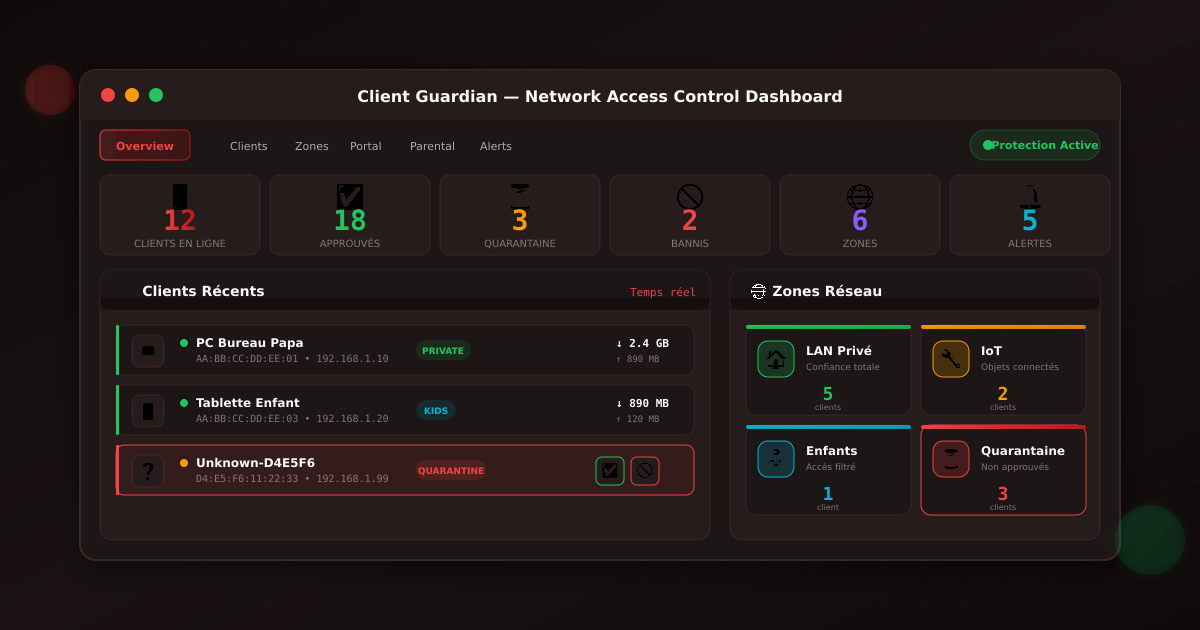
✨ Fonctionnalités
🔍 Surveillance Temps Réel
- Détection automatique des nouveaux clients (MAC + DHCP hostname)
- Statut en ligne/hors ligne en temps réel
- Historique de trafic par client (RX/TX)
- Première connexion / Dernière activité
🏠 Gestion des Zones
| Zone | Description | Internet | Local | Isolation |
|---|---|---|---|---|
| LAN Privé | Réseau de confiance | ✅ | ✅ | ❌ |
| IoT | Objets connectés | ✅ | ❌ | ✅ |
| Enfants | Accès filtré | ✅ Filtré | ✅ | ❌ |
| Invités | Accès limité | ✅ Limité | ❌ | ✅ |
| Quarantaine | Non approuvés | ❌ Portal | ❌ | ✅ |
| Bloqué | Bannis | ❌ | ❌ | ✅ |
⏳ Politique par Défaut : Quarantaine
- Tout nouveau client non reconnu → Quarantaine automatique
- Accès uniquement au portail captif
- Approbation manuelle requise pour accès complet
- Protection contre les intrusions
🚪 Portail Captif Nouvelle Génération
- Interface moderne et personnalisable
- Authentification par mot de passe / inscription
- Conditions d'utilisation acceptées
- Durée de session configurable
- Logo et couleurs personnalisables
👨👩👧👦 Contrôle Parental
- Plages horaires : Blocage nocturne, heures scolaires
- Filtrage de contenu : Adulte, violence, jeux d'argent
- SafeSearch forcé : Google, Bing, YouTube
- YouTube Mode Restreint
- Listes blanches/noires d'URLs personnalisées
- Quotas journaliers de temps d'écran
🔔 Alertes SMS & Email
- Nouveau client détecté
- Tentative de client banni
- Quota dépassé
- Activité suspecte (scan de ports, etc.)
- Templates personnalisables
- Fournisseurs SMS : Twilio, Nexmo, OVH
📦 Installation
Prérequis
opkg update
opkg install luci-base rpcd dnsmasq-full iptables uhttpd
Optionnels
# Pour les notifications
opkg install msmtp curl

# Pour le filtrage DNS
opkg install adblock

# Pour les quotas de bande passante
opkg install sqm-scripts
Installation du package
# Depuis les sources
git clone https://github.com/gkerma/luci-app-client-guardian.git
cd luci-app-client-guardian
make install

# Redémarrer rpcd
/etc/init.d/rpcd restart
🎯 Utilisation
Workflow Typique
- Nouveau client se connecte → Automatiquement en quarantaine
- Alerte envoyée → SMS/Email à l'admin
- Admin vérifie → Dans le dashboard LuCI
- Décision :
- ✅ Approuver → Assigner à une zone (LAN, IoT, Enfants...)
- 🚫 Bannir → Bloquer définitivement
Actions sur les Clients
| Action | Description |
|---|---|
| ✅ Approuver | Sortir de quarantaine, assigner zone |
| 🚫 Bannir | Bloquer tout accès réseau |
| ⏳ Quarantaine | Remettre en isolation |
| ✏️ Modifier | Changer nom, zone, quota |
🔧 Configuration
Fichier UCI /etc/config/client-guardian
# Configuration globale
config client-guardian 'config'
    option enabled '1'
    option default_policy 'quarantine'
    option scan_interval '30'
    option portal_enabled '1'

# Alertes Email
config email 'email'
    option enabled '1'
    option smtp_server 'smtp.gmail.com'
    option smtp_port '587'
    option smtp_user 'user@gmail.com'
    list recipients 'admin@example.com'

# Alertes SMS (Twilio)
config sms 'sms'
    option enabled '1'
    option provider 'twilio'
    option api_key 'ACxxxxx'
    option api_secret 'xxxxx'
    list recipients '+33612345678'

# Zone personnalisée
config zone 'gaming'
    option name 'Gaming'
    option network 'lan'
    option internet_access '1'
    option bandwidth_limit '0'
    option time_restrictions '0'

# Client connu
config client 'mon_pc'
    option name 'PC Bureau'
    option mac 'AA:BB:CC:DD:EE:FF'
    option zone 'lan_private'
    option status 'approved'
    option static_ip '192.168.1.10'
🏗️ Architecture
┌──────────────────────────────────────────────────────────────┐
│                      LuCI Web Interface                       │
│  ┌──────────┬──────────┬──────────┬──────────┬──────────┐   │
│  │ Overview │ Clients  │  Zones   │  Portal  │ Parental │   │
│  └──────────┴──────────┴──────────┴──────────┴──────────┘   │
├──────────────────────────────────────────────────────────────┤
│                        RPCD Backend                           │
│  ┌─────────────────────────────────────────────────────────┐ │
│  │ status | clients | zones | approve | ban | quarantine  │ │
│  └─────────────────────────────────────────────────────────┘ │
├──────────────────────────────────────────────────────────────┤
│                     System Integration                        │
│  ┌───────────┬───────────┬───────────┬───────────────────┐  │
│  │  dnsmasq  │ iptables  │  arptables │ uhttpd (portal)  │  │
│  │  (DHCP)   │ (firewall)│  (MAC)     │                  │  │
│  └───────────┴───────────┴───────────┴───────────────────┘  │
├──────────────────────────────────────────────────────────────┤
│                       Alert System                            │
│  ┌───────────────────┬────────────────────────────────────┐ │
│  │   Email (msmtp)   │      SMS (Twilio/Nexmo/OVH)       │ │
│  └───────────────────┴────────────────────────────────────┘ │
└──────────────────────────────────────────────────────────────┘
📊 API RPCD
| Méthode | Description | Paramètres |
|---|---|---|
status |
État global du système | - |
clients |
Liste tous les clients | - |
zones |
Liste toutes les zones | - |
parental |
Config contrôle parental | - |
portal |
Config portail captif | - |
alerts |
Config alertes | - |
logs |
Journal d'événements | limit, level |
approve_client |
Approuver un client | mac, name, zone |
ban_client |
Bannir un client | mac, reason |
quarantine_client |
Mettre en quarantaine | mac |
update_client |
Modifier un client | section, name, zone... |
update_zone |
Modifier une zone | id, name, bandwidth_limit... |
update_portal |
Modifier le portail | title, subtitle... |
send_test_alert |
Envoyer alerte test | type (email/sms) |
🔐 Sécurité
- Quarantaine par défaut : Aucun accès sans approbation
- Isolation des zones : IoT isolé du LAN
- Détection d'intrusion : Alertes en temps réel
- Historique complet : Logs de toutes les connexions
- ACL : Permissions granulaires pour l'API
🎨 Thème
- Couleur principale : Rouge sécurité (#ef4444)
- Fond : Dark mode (#0f0a0a)
- Zones : Couleurs distinctes par type
- Animations : Pulse pour quarantaine, glow pour alertes
📁 Structure du Package
luci-app-client-guardian/
├── Makefile
├── README.md
├── htdocs/luci-static/resources/
│   ├── client-guardian/
│   │   ├── api.js
│   │   └── dashboard.css
│   └── view/client-guardian/
│       ├── overview.js
│       ├── clients.js
│       ├── zones.js
│       ├── portal.js
│       ├── parental.js
│       ├── alerts.js
│       └── logs.js
└── root/
    ├── etc/
    │   └── config/client-guardian
    └── usr/
        ├── libexec/rpcd/client-guardian
        └── share/
            ├── luci/menu.d/luci-app-client-guardian.json
            └── rpcd/acl.d/luci-app-client-guardian.json
🛣️ Roadmap
- Surveillance temps réel
- Gestion des zones
- Portail captif
- Contrôle parental
- Alertes Email/SMS
- Intégration Pi-hole
- Statistiques graphiques (historique)
- Application mobile
- API REST externe
- Intégration Home Assistant
📄 Licence
Apache-2.0 - Voir LICENSE
👤 Auteur
Gandalf - CyberMind.fr
Protégez votre réseau avec Client Guardian 🛡️